File Property Edit Pro3.75
Publisher Description
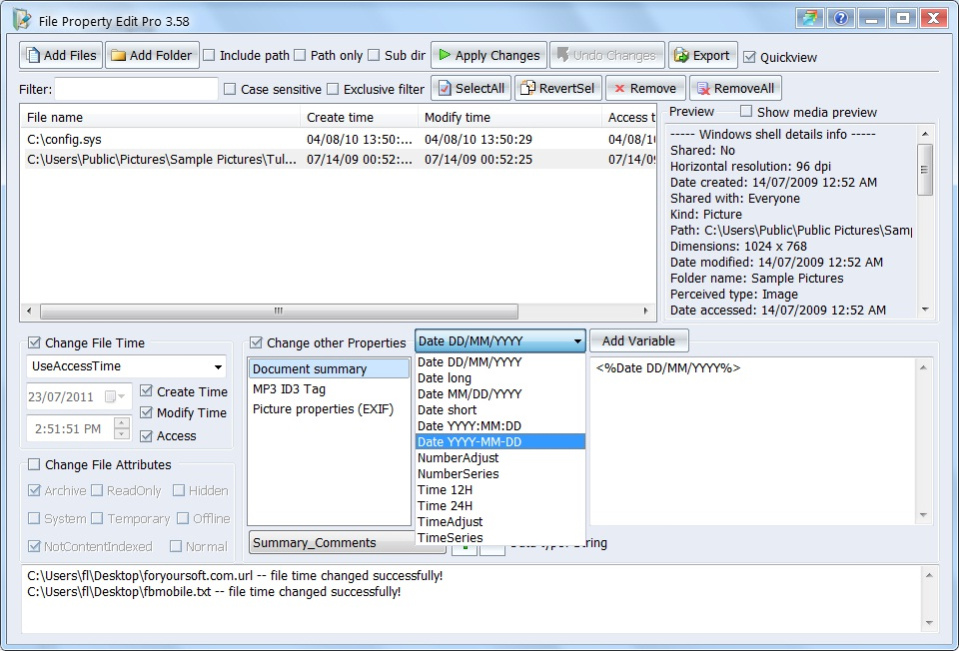
Use File Property Edit, with just several mouse click, you can easily change the files' attributes, including "create time", "modify time", "last access time", "Realonly", "Hidden", "System"... and modify their diversify properties, like document summary properties, MP3 Tags, and photo's EXIF properties. With the powerful file and folder browse feature plus the drag and drop support, you can easily add a group of files and/or directories. The 1-click Undo feature allows you to rollback all the changes you just made. It also supports quick preview feature, which allows you to see the picture's thumbnail when you edit it.
Main features:
*Support modify all types of photo's properties including EXIF.
*Support modify MP3 Tags.
*Support modify AVI Tags.
*QuickView feature added - Support thumbnail preview of photo.
* Modify file and folder's "created date time", "modified date time", and "Last access date time".
* Modify file and folder's attributes including "Archive", "Read Only", "Hidden", "System", "Temporary", "Offline", "Content index", or "Normal".
* Edit the file's summary properties including: "Title", "Subject", "Author", "Keywords", "Comments", "Template", "Last Author", "Revision Number", and "App Name".
* Export properties feature, you can export file properties into XML or CSV file.
* Drag and Drop: It's easy to add files to the list, just drag files from anywhere and drop them to File Property Edit's list.
* Undo changes: After you change the properties of files and folders, you can use this to cancel the changes, and rollback the old property values.
* Files filter support case sensitive and exclusive filtering - you can easily filter in or out the files you want from the file list.
* 15 color themes selectable
* Automatic online update
* FREE download!
* 3-year FREE upgrade!
* 3-year FREE technical support via email!
About File Property Edit Pro
This File & Disk Management program is available in English. It was last updated on 29 September, 2026. File Property Edit Pro is compatible with the following operating systems: Windows.
The company that develops File Property Edit Pro is foryoursoft.com. The latest version released by its developer is 3.75. This version was rated by 4 users of our site and has an average rating of 5.0.
The download we have available for File Property Edit Pro has a file size of 1.0 MB. Just click the green Download button above to start the downloading process. The program is listed on our website since 2013-06-23 and was downloaded 783 times. We have already checked if the download link is safe, however for your own protection we recommend that you scan the downloaded software with your antivirus. Your antivirus may detect the File Property Edit Pro as malware if the download link is broken.
How to install File Property Edit Pro on your Windows device:
- Click on the Download button on our website. This will start the download from the website of the developer.
- Once the File Property Edit Pro is downloaded click on it to start the setup process (assuming you are on a desktop computer).
- When the installation is finished you should be able to see and run the program.
Program Details
System requirements
Download information
Pricing
Version History
version 3.75
posted on 2013-06-23
1. Improve EXIF property processing speed. 2. Bug fix for EXIF binary data edit. 3. New variable "FileExtension" added. 4. EXIF property list name improved. 5. UI improved, files count displayed in step 1.
version 3.57
posted on 2011-06-14
1. New feature added: support using variable to change file data time addributes. 2. Minor text error corrected. 3. UI improved.
